
软件
- 综合
- 软件
- 文章
- 安卓
2012/11/12 13:00:08作者:佚名来源:网络
【实例名称】
Ajax效果的字符串过滤
【实例描述】
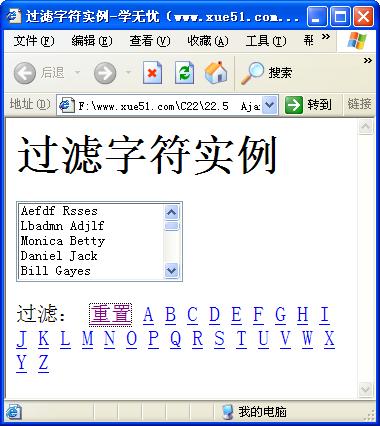
在Microsoft提供的Ajax框架中,有个根据第一个字母选择单词的过滤实例。本例将学习如何使用正则实现这种效果。
【实例代码】
<HTML><HEAD><TITLE>过滤字符实例-学无忧(www.xue51.com)</title>
<script type="text/javascript">
function filterlist(selectobj) {
  // 过滤对象
  this.selectobj = selectobj;  //要过滤得字符-i表示忽略大小写,""表示不忽略
  this.flags = 'i';
  // 要过滤的项-选择是文本还是值
  this.match_text = true;
  this.match_value = false;
  //调试参数
  this.show_debug = false;
  //初始化的方法
  this.init = function() {
    if (!this.selectobj) return this.debug('没有实现过滤的控件');
    if (!this.selectobj.options) return this.debug('过滤控件中没有内容');
    //制作选择项的副本
    this.optionscopy = new Array();
    if (this.selectobj && this.selectobj.options) {
      for (var i=0; i < this.selectobj.options.length; i++) {
        // 创建一个新的选择项对象
        this.optionscopy[i] = new Option();
        // 设置选择项的文本
        this.optionscopy[i].text = selectobj.options[i].text;
        // 设置选择项的值
        if (selectobj.options[i].value) {
          this.optionscopy[i].value = selectobj.options[i].value;
        } else {
          this.optionscopy[i].value = selectobj.options[i].text;
        }
      }
    }
  }
  this.reset = function() {   //重置选择项
    this.set('');
  }   //实现过滤的方法
  this.set = function(pattern) {
    var loop=0, index=0, regexp, e;
    if (!this.selectobj) return this.debug('没有实现过滤的控件');
    if (!this.selectobj.options) return this.debug('过滤控件中没有内容');    // 清空列表中的内容
    this.selectobj.options.length = 0;    // 使用正则实现字符过滤-初始化正则
    try {
      regexp = new RegExp(pattern, this.flags);    } catch(e) {
      if (typeof this.hook == 'function') {
        this.hook();
      }
      return;
    }
    // 循环添加过滤后的结果
    for (loop=0; loop < this.optionscopy.length; loop++) {
      // 定义选择项
      var option = this.optionscopy[loop];
      // 实现正则式过滤
      if ((this.match_text && regexp.test(option.text)) ||
          (this.match_value && regexp.test(option.value))) {
        // 使用过滤结果创建新选择项        this.selectobj.options[index++] =
          new Option(option.text, option.value, false);
      }
    }
    if (typeof this.hook == 'function') {
      this.hook();
    }
  }  //设置正则表达式的过滤标志
  this.set_ignore_case = function(value) {
    if (value) {
      this.flags = 'i';
    } else {
      this.flags = '';
    }
  }
  this.debug = function(msg) {    //调试方法
    if (this.show_debug) {
      alert('过滤结果: ' + msg);
    }
  }
  this.init();                        //调用初始化方法
}
</script>
</HEAD>
<BODY>
<H1>过滤字符实例</H1>
<FORM name=myform action=""><SELECT size=5 name=myselect> <OPTION>Aefdf
  Rsses<OPTION>Lbadmn Adjlf<OPTION>Monica Betty<OPTION>Daniel
  Jack<OPTION>Bill Gayes<OPTION>Lama Tampel<OPTION>Natty
  Lees<OPTION>Harry J. Leoo<OPTION>Matty McColm<OPTION>Carrie-Anne
  Moss<OPTION>Collin Chou<OPTION>Genevieve O'Reilly<OPTION>Harold Perrineau
  Jr.<OPTION>Jada Pinkett Smith<OPTION>Adrian Rayment<OPTION>Neil
  Rayment<OPTION>Bruce Spence<OPTION>Hugo Weaving<OPTION>Lambert
  Wilson<OPTION>Anthony Wong</OPTION></SELECT>
<SCRIPT type=text/javascript>
var myfilter = new filterlist(document.myform.myselect);  //调用过滤的方法
</SCRIPT>

<P>过滤: <A title="Clear the filter"
href="javascript:myfilter.reset()">重置</A> <A
title="Show items starting with A" href="javascript:myfilter.set('^A')">A</A> <A
title="Show items starting with B" href="javascript:myfilter.set('^B')">B</A> <A
title="Show items starting with C" href="javascript:myfilter.set('^C')">C</A> <A
title="Show items starting with D" href="javascript:myfilter.set('^D')">D</A> <A
title="Show items starting with E" href="javascript:myfilter.set('^E')">E</A> <A
title="Show items starting with F" href="javascript:myfilter.set('^F')">F</A> <A
title="Show items starting with G" href="javascript:myfilter.set('^G')">G</A> <A
title="Show items starting with H" href="javascript:myfilter.set('^H')">H</A> <A
title="Show items starting with I" href="javascript:myfilter.set('^I')">I</A> <A
title="Show items starting with J" href="javascript:myfilter.set('^J')">J</A> <A
title="Show items starting with K" href="javascript:myfilter.set('^K')">K</A> <A
title="Show items starting with L" href="javascript:myfilter.set('^L')">L</A> <A
title="Show items starting with M" href="javascript:myfilter.set('^M')">M</A> <A
title="Show items starting with N" href="javascript:myfilter.set('^N')">N</A> <A
title="Show items starting with O" href="javascript:myfilter.set('^O')">O</A> <A
title="Show items starting with P" href="javascript:myfilter.set('^P')">P</A> <A
title="Show items starting with Q" href="javascript:myfilter.set('^Q')">Q</A> <A
title="Show items starting with R" href="javascript:myfilter.set('^R')">R</A> <A
title="Show items starting with S" href="javascript:myfilter.set('^S')">S</A> <A
title="Show items starting with T" href="javascript:myfilter.set('^T')">T</A> <A
title="Show items starting with U" href="javascript:myfilter.set('^U')">U</A> <A
title="Show items starting with V" href="javascript:myfilter.set('^V')">V</A> <A
title="Show items starting with W" href="javascript:myfilter.set('^W')">W</A> <A
title="Show items starting with X" href="javascript:myfilter.set('^X')">X</A> <A
title="Show items starting with Y" href="javascript:myfilter.set('^Y')">Y</A> <A
title="Show items starting with Z" href="javascript:myfilter.set('^Z')">Z</A>
</P></FORM></BODY></HTML>
【运行效果】
【难点剖析】
本例的重点是使用正则表达式实现字符的过滤,还实现了动态添加列表项的功能。代码中使用“new”关键字创建了RegExp对象,其用来提供简单的正则表达式支持功能。使用RegExp对象的“test”方法,可以对指定的字符串执行一个正则表达式搜索,并返回一个布尔值指示是否找到匹配的模式。当搜索到结果时就使用“new Option”动态创建一个列表项,同时添加到列表中。
【源码下载】
为了JS代码的准确性,请点击:Ajax效果的字符串过滤 进行本实例源码下载
标签: Ajax效果 字符串
相关文章

够快云库v6.3.24.12120免费版
详情
光影魔术手官方版 v4.7.1
详情
ADsafe净网大师v5.4.408.7000
详情
网易邮箱大师v5.3.2.1015电脑版
详情
foxmailv7.2.25.375
详情
暴风影音5v5.92.0824.1111
详情
暴风影音v5.92.0824.1111
详情
BitComet(比特彗星)v2.13.4.13Beta2
详情
路由优化大师v4.5.31.267
详情
茄子快传电脑版 v5.1.0.7
详情
搜狐影音 v7.2.1.0官方版
详情
搜狐影音客户端 v7.2.1.0
详情
迅雷影音官方版 v7.0.3.92
详情
cbox央视影音v6.0.3.4经典版
详情
potplayer播放器v1.7.22496
详情
Daum PotPlayer(已集成直播源)v1.7.22496绿色纯净美化便携增强版
详情
NBA2K21曼巴永恒版v1.0中文
详情
赛博朋克2077v1.0中文
详情
天国拯救2黄金版 Build.17149332-1.1.1.11377中文版
详情
燕云十六声电脑版 v1.9.31
详情
潜行者2:切尔诺贝利之心 Build.16805297豪华中文版
详情
模拟农场25豪华中文版
详情
迷你世界电脑版 v1.41.00
详情
骑马与砍杀2 v1.2.9.34019免费版
详情
侠盗猎车手圣安地列斯 v1.0最新中文版
详情
整蛊白云 v1.0
详情
地平线4 v1.476中文版
详情
圣女战旗中文v1.1.9绿色免安装版
详情
狂怒2中文
详情
红色警戒2共和国之辉电脑版 v1.0
详情
模拟人生4 v1.0中文免费版
详情
蛊婆v1.0免费版
详情